
How I used free EdTech tools to bring Gagné’s Nine Events to life in the EFL classroom
It’s one thing to know the theory and another to put it into practice. As an instructional designer and a former EFL instructor, I’m deeply interested in merging proven learning theories with practical EdTech tools.
In this post, I’ll walk you through how I designed a writing lesson for B1 level EFL learners, using Gagné’s Nine Events of Instruction as a guiding framework. Each stage of the lesson integrates a free EdTech tool to create an engaging, learner-centred experience. The aim of the lesson is a travel blog post that students not only write, but also personalise, share, and reflect on.*
Feel free to explore the interactive presentation here. Here’s how I put it all together, step by step.
From blank page to published blog post in 9 steps
- The learning objective is for young adult learners to write a short, effective travel blog post using descriptive language.
- The design prioritises an interactive, collaborative, and learner-centred experience.
- Although designed as an instructor-led lesson, it can be easily adapted into a self-paced format if needed.
- You’ll find links to all the tools and activities so you can explore or reuse them.
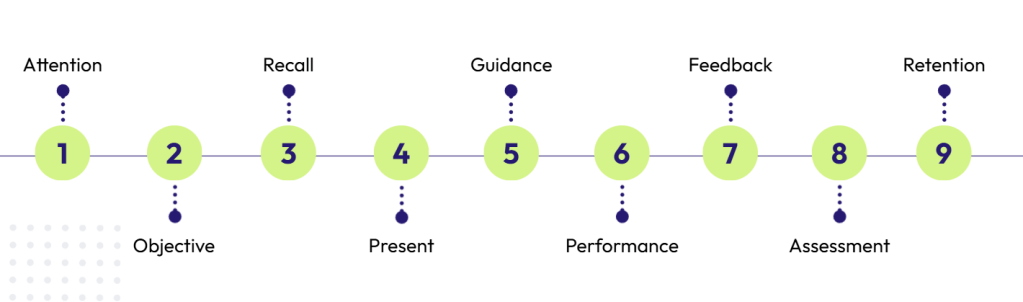
1. Gaining attention
- Purpose: To spark curiosity and activate schemata. This initial hook is critical for cognitive engagement.
- Implementation: The instructor begins with a Genially presentation showing stunning photos of famous tourist destinations, asking students: “Where do you think this is? Why do people find these places so appealing?” This immediately captures their interest and leads into a discussion that introduces the concept of travel blogs.
- Why this tool? Genially is perfect for creating visually rich, interactive presentations that capture student attention from the very first minute.
2. Informing the learner of the objective

- Purpose: To set expectations, reduce ambiguity, and provide a clear goal, which is a key motivator for adult/young adult learners.
- Implementation: The learning objective is explicitly stated on a dedicated slide (4) in the Genially presentation.
- Why this tool? Keeping the objective within the same presentation tool provides a seamless flow from the “hook” to the “what’s next,” maintaining a cohesive learning experience.
3. Stimulating recall of prior knowledge
- Purpose: To activate background knowledge and connect new learning with prior experiences.
- Implementation: Learners read a sample blog paragraph in Genially slide (5) and use their existing vocabulary and knowledge to guess the location. This is followed by a task where learners identify adjectives in the text used to describe the city.
- Why this tool? Genially’s click-to-reveal feature creates an engaging mini-challenge around guessing the city. This initial mystery captures their attention and provides context. Then the city is revealed and learners are tasked with identifying the descriptive adjectives in the paragraph. These are the words they are expected to already know. This two-step task acts as a bridge between what learners already know and what they are about to learn.
4. Presenting the content
- Purpose: To deliver new information in a structured and digestible format, minimising cognitive load.
- Implementation: The process begins with a quick grouping activity on LearningApps, where students sort adjectives into categories without immediate feedback, encouraging initial exploration. Next, the instructor presents a new Genially slide (7) that showcases example sentences and images, explicitly demonstrating how to use these phrases correctly.
- Why these tools? LearningApps provides a quick, gamified way for students to interact with the new vocabulary before formal instruction. With the interactive images and example sentences, Genially helps learners visualise and internalise the language. This combination allows for both discovery-based learning (LearningApps) and direct instruction (Genially), catering to different learning preferences.
5. Providing learning guidance

- Purpose: To scaffold learning with more examples and controlled practice, supporting active processing.
- Implementation: Learners use Quizlet flashcards and matching games for self-paced practice. They first explore the meanings and usage of the target language, then play the “Match” game to reinforce their learning. Afterwards, the session returns to the LearningApps activity, where answers are checked as a group so students can see what they got right and correct their mistakes.
- Why this tool? Quizlet provides a safe, gamified environment for self-paced practice and repetition, while the return to LearningApps creates a guided feedback loop that solidifies understanding.
6. Eliciting performance
- Purpose: To allow learners to apply their knowledge first with support, then independently.
- Implementation: The process follows two stages. First, learners complete a scaffolded practice task using an Educaplay Fill in the Blanks activity, where they drag and drop words to complete a model blog post. This task offers instant feedback and serves as both language reinforcement and a writing example. Building on this support, learners then move to an independent task: writing their own short blog posts on a shared Padlet board, guided by clear instructions.
- Why these tools? Educaplay is ideal here for building confidence before the main task. Padlet then provides a flexible, collaborative space for the primary performance task, acting as a digital canvas for their work.
7. Providing feedback

- Purpose: To leverage peer-to-peer feedback, which promotes collaborative learning and critical thinking.
- Implementation: On Padlet, students give and receive feedback from their peers using a provided template. The focus is not just on correcting errors, but on sharing what they liked and offering constructive suggestions.
- Why this tool? Padlet acts as a digital wall, making the work and feedback visible to all, fostering a community of practice.
8. Assessing performance
- Purpose: To formally evaluate whether the learning objective has been met against pre-defined criteria.
- Implementation: Using a rubric shared on the Padlet board, the instructor reviews each student’s blog post. They provide feedback using a star-rating system and add specific comments on what was done well and a suggestion for improvement.
- Why this approach works: Keeping the rubric and the assessment on the same Padlet makes the evaluation process transparent and easy for learners to follow.
9. Enhancing retention and transfer

- Purpose: The ultimate goal of learning: applying the skill in a new, authentic context to move the learner from a controlled task to a real-world simulation.
- Implementation: For the final step, learners take their writing to the next level. They choose a Canva template (on slide 13) to design a visually appealing, authentic-looking blog post, personalising it with images and layouts. The final creation is then shared on the class LMS.
- Why this tool? Canva empowers learners to move beyond simple text and become digital creators, helping them take pride in their work. It provides the performance support necessary to apply their writing skills in a professional format, solidifying retention.
Bringing it all together
Designing this lesson with Gagné’s Nine Events of Instruction provided a clear roadmap, helping me focus on both the logical flow of activities and overall student engagement. Matching each stage with a free EdTech tool wasn’t just about making the lesson more interactive, it was also about creating alignment between pedagogy and technology.
Instead of using tools just for the sake of it, each one played a meaningful role in the learner’s cognitive journey.
This lesson transforms a standard writing task into an engaging, multi-stage project. Learners don’t just learn about adjectives; they practice, collaborate, design, and publish. They conclude the experience with a tangible product they can be proud of and, more importantly, with the confidence to use their English skills in creative and meaningful ways.
I hope this walkthrough gives you some inspiration to try it out, adapt it, and make it your own. All links are provided so you can jump in and explore!
My special thanks to Sezer hocam (Sezer Köse Biber) for the brilliant idea that sparked this project. ✨
*Some of the written content used in this lesson is either directly taken or adapted from the Cambridge English Empower B2 book (Cambridge University Press), with modifications for instructional use.
🔗 If you found this breakdown of Gagné’s model helpful, you might also be interested in my post on Bloom’s Taxonomy in ELT & Instructional Design.
 ELT Chalkboard
Leave a comment